Customize your Desktop with Rainmeter.

You may used to use Rocketdock, Objectdock and other software to customize your Desktop, but today I recommend you to use Rainmeter instead.

Hack Candy Crush Saga by Using Firefox extension

Infinite lives and boosts, all unlocked charms are bought, so what are you waiting for ?

Fake CPU's name with regedit in Windows 7 and Windows 8

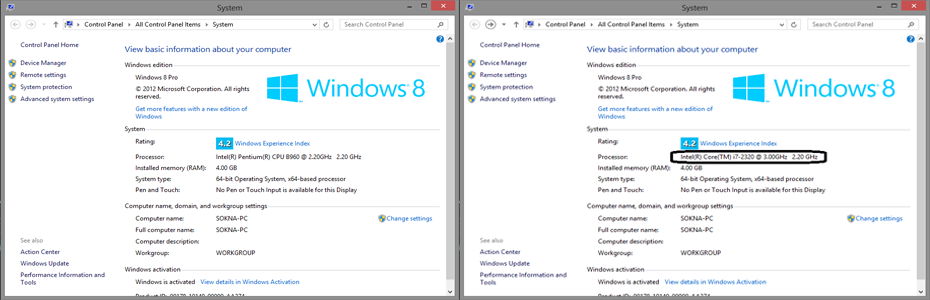
It looks so funny when I changed my Processor's Name to Intel(R) Core(TM) i7-2329 @ 3.00GHz. In fact, my processor is Intel(R) Pentium(R) CPU B960 @ 2.20GHz.Let's try together!

Wednesday, February 12, 2014

How to download torrent files with Internet Download Manager using Boxopus


Hi folks, today, I want to show you guys how to download torrent files with Internet Download Manager using boxopus. Boxopus is a new service that enables all users to download torrent directly. With clever use of Dropbox's API, BitTorrent users can add torrent files totally anonymously and without the need for a BitTorrent client. Torrent sites can add Boxopus as a new download option for their users, which some already have. Now lets start using boxopus.

  • Now let go to boxopus website and sign in.
  • You have two options to sign in into boxopus.
    • Sign in using facebook.
    • Sign in using email account.
  • Now, you have logged in into boxopus with your account. Take a look at the top-left side of the website and you will see one button named Add New Torrent.
  • To add torrent, you have two choices either.
    • Add torrent using torrent file (.torrent)


    • Add torrent using magnet link or URL.
  • After you have uploaded your torrent using two different methods as detailed above, boxopus will upload files from torrent into the cloud automatically, and it will generate link for your files. Unfortunately, there are plenty of people using boxopus, so uploading your files into cloud will take a time. Boxopus can't download all the torrents simultaneously. When all the previously added by other users torrents will be downloaded boxopus will carry about this one. It wont take much time, boxopus will notify you by email. Sometimes, boxopus will allow you to download files immediately.


  • OK, now, it is time to download by click button Download as screenshot.


  • Note: Boxopus gives you guys only 2 days for downloading your uploaded-file. Therefore, your file will be delete automatically.
    Thanks for reading my blog :)


Sunday, February 9, 2014

Game Word Jumble C++

This application was executed using Borland C++ 5.0.2.
Source Code: http://adf.ly/dIwlv 
                      http://bit.ly/1maR3Bo


Saturday, February 8, 2014

How to enable WiFi in BackTrack 5r3 Virtual Machine

       Most of BackTrack's users who installed BackTrack 5r3 in Virtual Machine (VMware or Virtual Box) always have a problem with WiFi ( As below screenshot ):

       Today, I'm happy to show you guys how to enable WiFi in BackTrack 5r3. Please follow my several steps below:
Step1: Download driver at http://adf.ly/dFwht or http://bit.ly/1bZX0KO(make sure that you keep file in root directory).
Step2: After downloaded driver, now extract file using terminal:

  • Open terminal and type: tar xvjf compat-wireless-2009-12-11.tar.bz2

 Step3: File had been extracted. Now, it's time to run some commands in terminal as below:

  • cd compat-wireless-2009-12-11


  •  make unload (It will show some errors but just ignore it)


  •  make load

 Step4: Now driver has been installed. If you want to make sure whether it works or not, please open terminal and run iwconfig or ifconfig wlan0. If it works, it will show as below screenshot.

Finally, it works. :)
Video Tutorial:
Thanks for visiting my blog.

Saturday, August 24, 2013

W3school Offline Version Full Website(Latest Update)

Hey guys! Today I'm gonna share one best thing that’s a lot of vital for all web designer and also the students who are learning web development. This is often the simplest website that you’ll be able to learn web development free. There is all languages that you need in web designing - Html5, Php, JavaScript, Etc, all the languages that is vital for web designing . There is simple quick tutorial that is easy to use. Sometimes when you don’t have internet connection and you need to find anything from w3schools, you can’t just find anything, but don’t worry I’ll gonna give you full website that can be used easily without internet anywhere and anytime.


Link to download:
Part 1: Click here or Click here
Part 2: Click here or Click here
Password: everyday-geeks

Thanks for visiting :)


Saturday, June 15, 2013

C Programming: Product Management

Code:


Result:


Friday, May 31, 2013

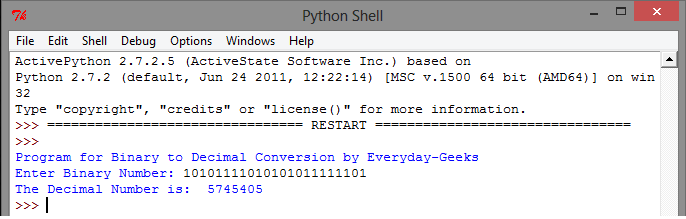
Python: Convert from Binary to Decimal

Code:

Result:


Fake iOS version in iPhone, iPad, iPhone using iFile (Jailbreak required)

I have changed my iOS version of my iPhone from 6.0.1( Untethered Jailbroke) to 6.1.3 and I lied them I have upgraded to iOS 6.1.3(Untethered Jailbroke).

Do you want to do this with your friend too?
Please follow several steps:

How to:


Make sure that your phone is Jailbroke.
Then install iFile, if you don't have it, just go to Cydia to install it.
After you installed it, open it now


You will see like below screenshot when you opened iFile:


Now you're running iFile and you're on Library Folder
On the top left-side under Status Bar you will see " / " then click it
After you clicked it, you will back to other folder(see below picture) and please scroll down and find folder named System => Library
Scroll down again to find CoreServices


In CoreServices Folder you will see file named SystemVersion.plist


This step you have to open SystemVersion.plist => ProductVersion


Now you change your iOS version to whatever you want.
Example: I want to change my iOS version to 6.1.3, I just change 6.0.1 to 6.1.3.
*Note: The number must be correct with its format. #.#.#

Finally, I can change my iOS version of my iPhone from 6.0.1 to 6.1.3.


*Note: If you want to download tweaks, applications, themes or others, please restore your iOS version.

Thanks for visit Everyday-Geeks blogspot
Enjoy together :)